Published: Wednesday 3rd February, 2010 | Author: Parm Mann
Companies: SilverstoneTek (All SilverstoneTek content)
We love it when an unusual contraption makes an appearance in our inbox, so you can understand our intrigue when SilverStone appeared with a product promising a "virtual super storage solution".
It's dubbed the HDDBOOST, and it essentially combines a traditional hard drive with a solid-state drive to create a storage solution that offers the capacity of former and the performance of the latter.
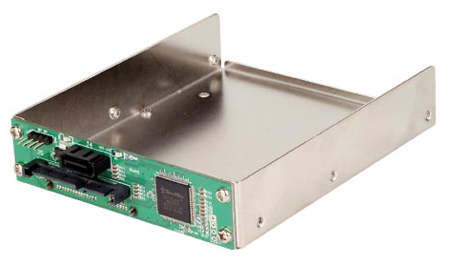
All sounds a bit weird, but here's how it works. You take your SSD - of any capacity, though SilverStone recommends at least 32GB for Windows users - and you plug it into one of HDDBOOST's three SATA 3Gbps ports. You plug your existing hard drive into the second port, and the third plugs in to your motherboard. Power everything up using SATA power cables from your PSU, and you're done.
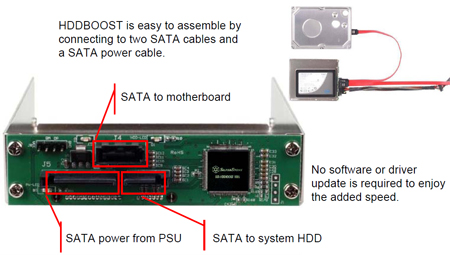
But here's where it gets interesting. Boot up and the unit will carry out a mirror backup, copying as much of your hard drive as possible over to the quicker SSD. Once that's complete, the HDDBOOST's integrated controller will configure the system to prioritise reading from the SSD. It'll still read from the HDD for data outside of the SSD mirrored zone, and it'll write back to the HDD, too, but SilverStone reckons the setup will provide over a 150 per cent increase in read speeds.
Whether or not you'll have to re-mirror the drives each time you boot remains a mystery, but what we're looking at here is effectively a hybrid storage system in which an SSD of any capacity can be used as a giant cache. Think of it like ReadyBoost on steroids.
Question is - why wouldn't you use the SSD as your primary disk instead? Good point, but we suppose the HDDBOOST could be useful for users who don't want to wipe their data, and want to taste the SSD benefits with their hard system disk remaining intact.
The unit is currently selling in Japan priced at under ¥5,000, which works out at around £35.

Copyright © 1998 - 2010, HEXUS.net. All rights reserved. Terms, conditions and privacy information.
HEXUS® is a registered trademark of HEXUS Limited.

HEXUS.community :: your right2reply
Easiest way to find out is if someone tests it.........
If SIlverStone want to send me one, plus a 1TB HDD and a 32GB SSD, I'll happily write a glowing review :DQuote
If this could hook into the Windows SuperFetch database and work out what to cache from there, it could be good, but I agree with most... why not just install Windows and your most commonly used programs on that small SSD and the rest on you HDD?
This!Quote
AIUI it does a mirror copy from the HDD to SSD on bootup. The SSD is only ever written to at that stage.
Then all writes go to the HDD (not to the SSD) and the new content then read from HDD.
So if lots of writes are happening, the SSD data will get used less and less (until a reboot/refresh)?
After the initial mirroring of data is completed, SSD and HDD will have the same front -end data. HDDBOOST’s controller chip will then set data read priority to SSD to take advantage of SSD’s much faster read speed. HDDBOOST’s priority will be determined by the following rules:
1.When data is present on both drives, read from SSD.
2.When data is not present on both drives, read from HDD.
3.Data will only be written to HDD.
Every time the system starts, HDDBOOST will initiate mirror backup automatically to ensure front-end data between the two drives are the same."
It also reads that the SSD doesn't need to the the same size as the HDD, which makes it more practical as a cache.
I'll be ordering one to play withQuote
I had a nice Windows 7 install and didn't feel like going through the hassel of a day or 2 of re-installing software on my machine which I finally have up and running completely stable and working perfectly. Honestly it was running so good I was hesitating using this thing for fear of really messing things up.
Some of you say that you should just start over, and I can see that argument, and for some that is a good argument, but sit down and look at your system and do you have and or remember every tweak, setting and driver installed, do you feel like doing it all over again?
I was skeptical, but I got a 32 gig SSD with claimed read of 230 and write of 120MB....
I hook it up and I literally DID NOT have to do a thing. There was NO software to run. You can download it if you want to to monitor or force a sync, but I leave that alone and let the unit do what it does....
The machine runs VERY VERY fast and the best part is to test it out, I can actually just open the case and pull out the SSD and restart and see how long a normal boot will take. Currently it takes 1 minute 18 seconds to get to a spot where I can confirm the last program is started. With the unit in place.... It drops to less than 25 seconds..... and this is from the moment I enter my password and press enter. The speed increase is worth it.
Total time for install. 5 minutes.... I have gained that back in 2 days and a few reboots.... Its not perfect, as it doesn't handle writes.... as it passes those off to the HDD, but I am very impressed with this.
This is nothing like you would expect with the Hybrids of a year or so back, or the new ones like the Momentenus...... this will blow them out of the water....
I don't have to worry about the SSD getting old and slowing down and TRIM support and all that stuff... I can swap out to a bigger and bigger unit until I can afford to us Acronis to clone my HDD onto an SSD, but until that day comes, I'm not going to waste another day getting my machine just right by reinstalling windows to take advantage of a 32 or 64 gig SSD, and then setup all my programs to run off my other HDD... this basically does the same thing, but without the work....
The ONLY time I would say not to use it, is if you are ALWAYS writing to the HDD like in a server environment or some other setup where you need maximum write speed.... then go with the reinstall... otherwise, this is a very wise investment...
I think after it syncs and you get that first boot, you will know you have a winner...
The ability to be able to pop in a bigger one as needed is a plus.... as the price drops you can put new ones inside in literally 30 seconds and enjoy....
No need to do the multi-drive setup.... in the end you basically end up with the same thing... windows loading off of the SSD and the rest of your stuff loading off your slower drive... so, why would you waste a day re-installing all your stuff when in the end you will see the drive at nearly full speed...
HardwareCanucks did a test and found that you get almost 95% of the rates SSD read speed... and other benefits...
for the price.... if you are considering an SSD you probably have an extra 50 laying around... try it... you may be more than shocked like I was.... so far I have shown 20 people... and 14 have installed it and love what they get......Quote
Reply