RSS 2.0 News Feed
HEXUS.net - Definitive Technology News and Reviews
Latest content
Graphics
Graphics
Sapphire Radeon HD 5970 in two-card CrossFireX
Latest Reviews
minimise maximise
Beans
minimise maximise
Guides
minimise maximise
Press Releases
minimise maximise
Win the fastest graphics card in the world with Sapphire!Enermax is giving away loads of swag... check it out!

Microsoft rethinks AutoPlay to counter growing threat of malware

Software
Software

Published: Thursday 30th April, 2009 | Author: Parm Mann
Products: Windows Vista, Windows 7, Windows XP
Companies: Microsoft (All Microsoft content)
External reviews: Microsoft Windows Vista
External reviews: Microsoft Windows 7

Addthis
printer friendly layout     discuss in the forums     email to a friend
Advertisement

Microsoft has revealed plans to improve security of its Windows operating systems by adjusting the AutoRun functionality first introduced in Windows 95 and later expanded via AutoPlay in Windows XP.

According to the software giant, malware such as the Conficker worm is known to utilise the AutoRun feature in an effort to mislead users into activating Trojan Horses. Despite the long-running availability of AutoRun, Microsoft states that a study from Forefront Client Security found 17.7 per cent of all malware infections in the second half of 2008 came as a result of AutoRun misuse.

As the largest single cause of malware infections, it's now working to rectify the apparent flaw. So, how will it go about it?

At present, users making use of removable media such as USB flash drives are presented with an AutoPlay menu that looks a little something like this:
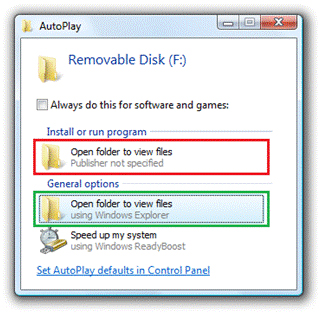
Microsoft's problem, and indeed the user's, is that hidden malware can be easily disguised to trick users into running harmful applications. In the above example, the link highlighted in red would launch the program and potentially infect a system whilst the link highlighted in green would merely run a Windows task.

It's an easy method of misleading users, and Microsoft's solution is to cease to display the AutoRun task for every device other than removable optical media. Following the change - which is already implemented into the Release Candidate of Windows 7 - users will no longer be provided with an AutoRun option in the AutoPlay menu, as shown below.
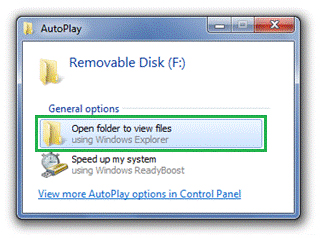
Whilst an obvious and easy solution, it could create problems for flash media that legitimately utilises the AutoRun functionality. Microsoft states it is "working with ecosystem partners to help mitigate situations where this AutoRun change will have an impact on them". Meanwhile, optical media such as non-writable CDs and DVDs will continue to allow the option to AutoRun.

The change in functionality is expected to appear in next week's Windows 7 Release Candidate, and will be implemented into Windows XP and Windows Vista via future software updates.



Please share this:

HEXUS related reading

HEXUS.net - news :: Windows 7 powers four per cent of PC market, says research
HEXUS.net - news :: Microsoft starts making Vista's Ultimate Extras available to all
HEXUS.net - news :: Microsoft Windows 7 boxed-unit sales thrash Vista's
HEXUS.channel - interviews :: Microsoft pitches Windows 7 at SMBs
HEXUS.channel - news :: Apple's new Mac ads attack Windows 7
HEXUS.channel - news :: Chinese court punishes Microsoft for IP infringement
HEXUS.channel - news :: Microsoft bigs-up Azure
HEXUS.channel - press releases :: Microsoft Cloud Services Vision Becomes Reality With Launch of Windows Azure Platform
HEXUS.channel - news :: Microsoft launches Bing UK
HEXUS.lifestyle - news :: Microsoft adds computational knowledge to Bing search results
HEXUS.net - press releases :: Paragon Backup & Recovery 10 Suite
HEXUS.net - news :: Firefox 3.6 Beta 3 now available
HEXUS.net - press releases :: Get the Look of Sci-Fi Holograms with Holomatrix from Red Giant Software
HEXUS.net - news :: Adobe's GPU-accelerated Flash Player 10.1 Beta now available
HEXUS.net - press releases :: Adobe AIR 2 and Flash Player 10.1 Beta Software Now Available
All Microsoft related content on HEXUS

HEXUS.community :: your right2reply

Re: News - Microsoft rethinks AutoPlay to counter growing threat of malware
Hardly.

Using Autorun is a very basic attack vector. It's the sort of thing that is so glaringly obvious, that no-one actually thought about disabling it until now.Quote
Re: News - Microsoft rethinks AutoPlay to counter growing threat of malware
I think OilSheikh might have been using sarcasm there, seeing as CIH corrupted the BIOS of some infected machines over ten years ago.Quote
Re: News - Microsoft rethinks AutoPlay to counter growing threat of malware
We use the following registry key at work to prevent AutoRun from working. Works fantastically well at stopping viruses that propagate via USB flash drives. More info here (http://nick.brown.free.fr/blog/labels/prevent%20virus%20USB%20memory%20stick%20worm%20conficker%20downadup%20kido%20disable%20autorun.html).


Code:
---------
Windows Registry Editor Version 5.00

[HKEY_LOCAL_MACHINE\SOFTWARE\Microsoft\Windows NT\CurrentVersion\IniFileMapping\Autorun.inf]
""="@SYS:DoesNotExist"
---------
N.B. When messing around with AutoRun settings be careful not to disable 'Auto Insert Notification' as this prevents Windows from detecting when discs are inserted/ejected.Quote
Re: News - Microsoft rethinks AutoPlay to counter growing threat of malware
Autoplay in Vista is a joke - "are you sure you want to continue"!!!!Quote
Re: News - Microsoft rethinks AutoPlay to counter growing threat of malware
Get TweakUI (a microsoft powertoy) and disable it. One of the first things I do on a new PC.

But the autorun on Vista & Win7 are fine. They don't automatically launch the exe specified in autorun.ini. Instead they, pop up a message asking you if you want to launch it or not. A much better approach IMHO.Quote

Reply

My HEXUS


:: New User
:: Lost Password

Browser Plugins
:: IE7 Search
:: Firefox 2 Search
Hottest items
minimise maximise
Latest Poll
minimise maximise

Which OS launch are you more excited by?


Headlines
minimise maximise